
Deploying HelixML on Talos: from kernel ABI quirks to a working coding-agent fleet


A field report from the Deviqon Labs homelab: Talos Kubernetes, ArgoCD, Vault, Mayastor, Intel iGPU passthrough, and a 397B self-hosted Qwen.
Why HelixML, and why bother self-hosting
I've been watching the AI-coding-agent landscape mature for the last year. Most of the tooling is built on the assumption that you either:
- ship your source code to a SaaS that wraps Claude / GPT, or
- you run a single CLI on your laptop and call it a day.
Neither fits how a small video-pipeline consultancy actually operates. Our code touches client IP under NDAs that make "paste the repo into someone else's cloud" a non-starter. And a single CLI on a laptop doesn't scale past one engineer, doesn't give the team a shared work board, and doesn't let an agent run for an hour while I do something else.
HelixML sits in a different spot. From the helix.ml product page:
- Kubernetes-native. Helm charts for
helix-controlplaneandhelix-sandbox, deployable on any conformant cluster. No vendor lock-in to a managed runtime. - BYO LLM. Anthropic, OpenAI, and any OpenAI-compatible endpoint. This means our self-hosted Qwen on Scaleway Managed Inference works as a first-class provider.
- Per-task sandboxing. Each agent gets its own Linux container with ephemeral git credentials, isolated filesystem, isolated network. Credentials are minted at task start and revoked at task end.
- Opinionated harness. Projects → Backlog → In Progress → Review → Done. Kanban for the whole team. Same UX whether the agent is Claude Code, Gemini CLI, Codex, or Qwen Code.
- Live observability. Streamed desktop view of what each agent is doing right now. Useful when you don't trust the agent yet and want to watch it work.
There's a marketing chart on the helix.ml site that frames this well, drawing on Steve Yegge's Eight Stages of AI-Assisted Coding:
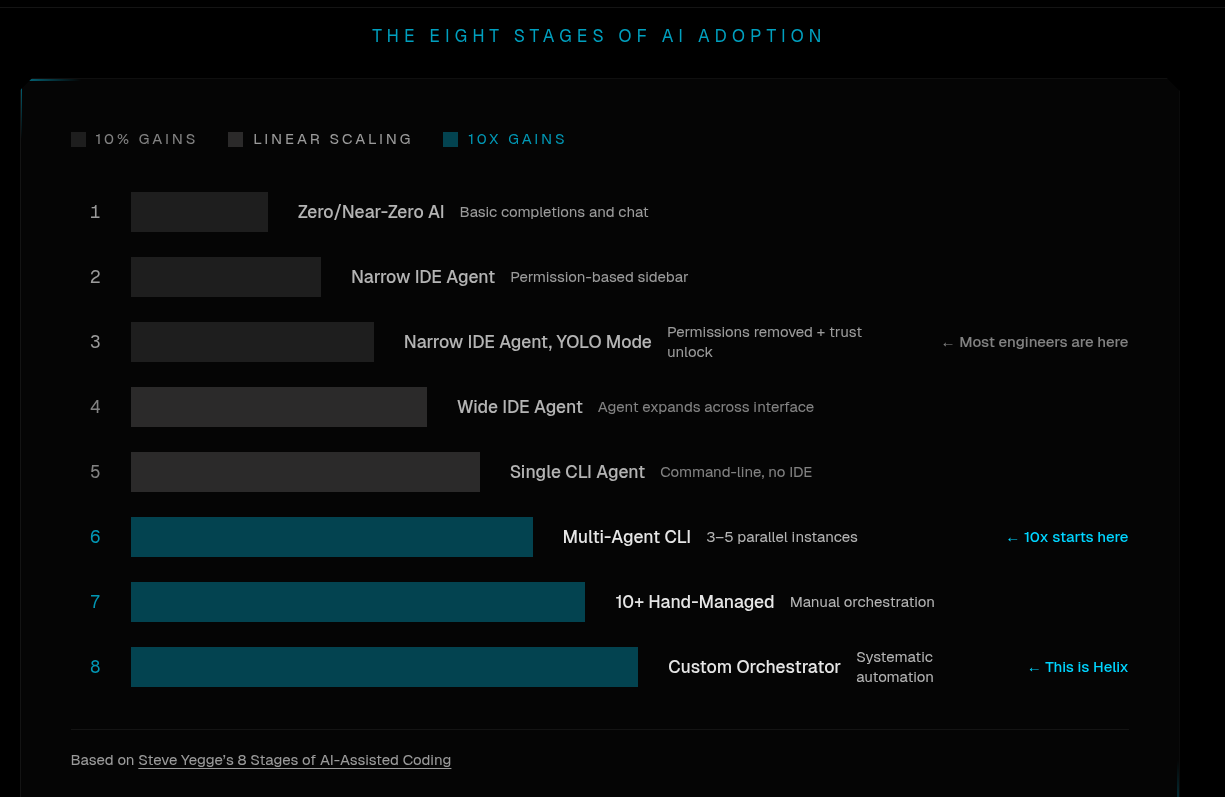
Stage 1: Zero / Near-Zero AI · basic completions and chat Stage 2: Narrow IDE Agent · permission-based sidebar Stage 3: Narrow IDE Agent, YOLO Mode · permissions removed + trust unlock (← most engineers are here) Stage 4: Wide IDE Agent · agent expands across interface Stage 5: Single CLI Agent · command-line, no IDE Stage 6: Multi-Agent CLI · 3–5 parallel instances (← 10× gains start here) Stage 7: 10+ Hand-Managed · manual orchestration Stage 8: Custom Orchestrator · systematic automation (← Helix lives here)
I won't argue every detail of Yegge's scale, but the punchline is right: the throughput cliff is between stage 5 and stage 6. One CLI gives you linear gains. Five parallel CLIs, each doing real PRs, gives you a different category of output. The hard part is the orchestrator: the spec layer that breaks a project into independently-runnable tasks, the credential plumbing, the sandbox per task, the review queue. That's what Helix is.
I'd rather pay for the orchestrator than build it.
The target architecture
What we're standing up:
┌─────────────────────────────────────────────────────────────────┐
│  Internal users (browser)                                       │
│    https://helix.deviqon.com  → internal-nginx ingress          │
└──────────────────────────────┬──────────────────────────────────┘
                               │
              ┌────────────────▼──────────────────┐
              │  helix-controlplane               │
              │  ─ Helix API + UI                 │
              │  ─ Haystack (RAG)                 │
              │  ─ SearXNG + headless Chrome      │
              │  ─ Kodit (code indexer)           │
              │  └─ External Postgres (CNPG)      │
              │  └─ VectorChord (pgvector + BM25) │
              └────────────────┬──────────────────┘
                               │ runner token
              ┌────────────────▼──────────────────┐
              │  helix-sandbox  (talos94)         │
              │  ─ Hydra (desktop orchestrator)   │
              │  ─ Nested dockerd                 │
              │  ─ Per-task Ubuntu desktops       │
              │      └─ /dev/dri (Intel HD 630)   │
              └────────────────┬──────────────────┘
                               │ OpenAI-compatible
              ┌────────────────▼──────────────────┐
              │  Scaleway Managed Inference       │
              │  Qwen3.5-397B-A17B (MoE, 17B act) │
              └───────────────────────────────────┘
Cross-cutting infrastructure already in place on the cluster:
- Talos Linux workers (
talos81..95) - ArgoCD for GitOps; every YAML below lives in our infra repo
- External Secrets Operator + HashiCorp Vault (
kv/helix) - CloudNativePG for Postgres
- OpenEBS Mayastor for stateful volumes (3-replica NVMe over NVMe-oF)
- cert-manager + internal nginx ingress
Helix has its own Linux + Kubernetes guide. It's a fine starting point, but it assumes a helm install flow. Below is what an ArgoCD + Vault deployment actually looks like, and the gotchas you hit along the way.
Step 1: Secrets in Vault, surfaced via ESO
Everything Helix needs in one Vault KV path: helix. Keys:
| Key | What it is |
|---|---|
license |
Helix license key |
api_token |
Runner token (controlplane ↔ sandbox auth) |
db_host |
CNPG cluster service |
db_port |
5432 |
db_name |
helix |
db_user |
helix |
db_password |
URL-safe (the chart doesn't escape it) |
vector_user |
VectorChord user |
vector_password |
VectorChord password |
vector_name |
VectorChord db name |
vector_dsn |
Full DSN (used by haystack) |
Vault view of the bag:
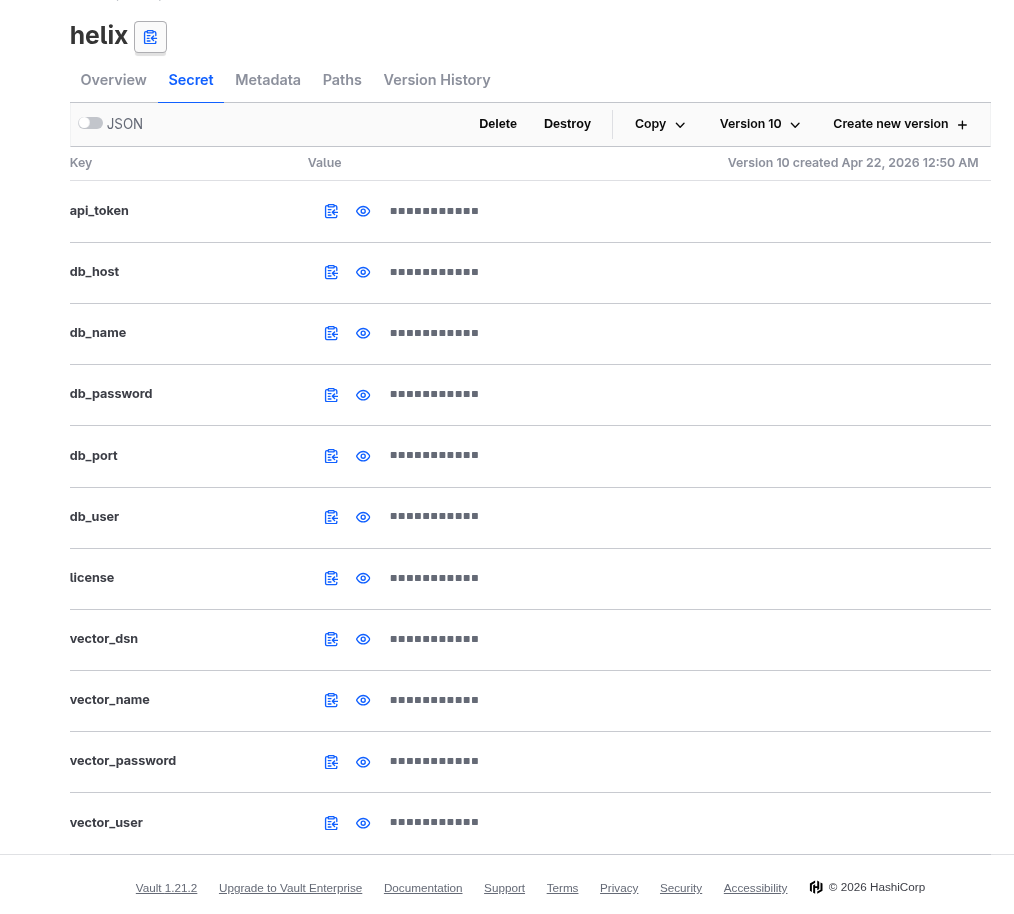
The ExternalSecret is intentionally boring: pull everything from helix, target a Secret called helix-secrets, refresh hourly:
# helix-secrets.yaml
apiVersion: external-secrets.io/v1
kind: ExternalSecret
metadata:
  name: helix-secrets
  namespace: helix
spec:
  refreshInterval: 1h
  secretStoreRef:
    name: vault-infra
    kind: ClusterSecretStore
  target:
    name: helix-secrets
  dataFrom:
    - extract:
        key: helix
Argo sync wave: add argocd.argoproj.io/sync-wave: "-1" on this manifest so the Secret exists before the chart tries to mount it. Otherwise Argo pulls Helm first, the deployment crash-loops looking for an unfound secret, ESO catches up, and it eventually self-heals. Works, but noisy.
Gotcha 1: the Helix docs are inconsistent with values.yaml. The Linux + Kubernetes guide uses license-key as the secret key and externalDatabase.* as the Helm path. The chart's actual values-example.yaml uses license and postgresql.external.*. Trust the chart, not the docs. We hit this on the very first sync.
Step 2: Intel GPU plumbing
Helix-sandbox uses a GPU for hardware-accelerated desktop encoding (Moonlight protocol streams the live agent desktop to the browser). Helix's runners are NVIDIA-only, but the sandbox will happily take any /dev/dri-capable GPU and use it for QSV/VAAPI encode. On a budget homelab, that means Intel iGPUs.
2a: Talos system extensions
Bake siderolabs/i915 (and microcode) into your worker schematic via the Talos Image Factory:
# schematic.yaml
customization:
  systemExtensions:
    officialExtensions:
      - siderolabs/i915
      - siderolabs/intel-ucode
  extraKernelArgs:
    - net.ifnames=0
    - intel_iommu=on
SCHEMATIC_ID=$(curl -sX POST --data-binary @schematic.yaml \
https://factory.talos.dev/schematics \
-H "Content-Type: application/yaml" | jq -r '.id')
talosctl -n <node-ip> upgrade \
--image factory.talos.dev/installer/${SCHEMATIC_ID}:v1.11.6 \
--preserveVerify /dev/dri shows up:
talosctl -n <node-ip> ls /dev/dri
# card0, renderD128
Note for Talos 1.10+:
machine.install.extraKernelArgsis silently ignored on UKI-based installs. Kernel args belong in the schematic.
2b: Intel Device Plugin Operator
The intel-device-plugins-gpu chart creates a GpuDevicePlugin CR, but that CRD is shipped by the operator, not the chart. Install the operator first, then the GPU plugin.
# intel-device-plugin-operator.yaml
apiVersion: argoproj.io/v1alpha1
kind: Application
metadata:
  name: intel-operator
  namespace: argocd
spec:
  destination:
    namespace: intel
    server: https://kubernetes.default.svc
  project: default
  source:
    chart: intel-device-plugins-operator
    helm:
      values: |-
        # nothing to set
    repoURL: https://intel.github.io/helm-charts
    targetRevision: '*'
  syncPolicy:
    automated:
      prune: true
      selfHeal: true
    managedNamespaceMetadata:
      labels:
        pod-security.kubernetes.io/audit: privileged
        pod-security.kubernetes.io/enforce: privileged
        pod-security.kubernetes.io/warn: privileged
    syncOptions:
      - CreateNamespace=true
# intel-gpu.yaml
apiVersion: argoproj.io/v1alpha1
kind: Application
metadata:
name: intel-gpu
namespace: argocd
spec:
destination:
namespace: intel
server: https://kubernetes.default.svc
project: default
source:
chart: intel-device-plugins-gpu
helm:
values: |-
sharedDevNum: 10
nodeFeatureRule: true
repoURL: https://intel.github.io/helm-charts
targetRevision: '*'
syncPolicy:
automated:
prune: true
selfHeal: true
managedNamespaceMetadata:
labels:
pod-security.kubernetes.io/audit: privileged
pod-security.kubernetes.io/enforce: privileged
pod-security.kubernetes.io/warn: privileged
syncOptions:
- CreateNamespace=truesharedDevNum: 10 lets ten pods share one physical GPU. Fine for transcode, you'd want 1 for compute. nodeFeatureRule: true flips on the NFD-driven auto-labeling so the plugin pod only schedules where a GPU exists.
Verify:
kubectl get nodes -o jsonpath='{range .items[*]}{.metadata.name}{"\t"}{.status.allocatable.gpu\.intel\.com/i915}{"\n"}{end}' | column -tYou should see 10 on any node with an Intel GPU.
Step 3: The control plane
# helix-controlplane.yaml
apiVersion: argoproj.io/v1alpha1
kind: Application
metadata:
  name: helix-controlplane
  namespace: argocd
spec:
  destination:
    namespace: helix
    server: https://kubernetes.default.svc
  project: default
  source:
    chart: helix-controlplane
    helm:
      values: |-

        global:
          serverUrl: https://helix.deviqon.com

        searxng:
          enabled: true

        chrome:
          enabled: true

        controlplane:
          env:
            SANDBOX_API_URL: http://helix-controlplane.helix.svc.cluster.local

          licenseKeyExistingSecret: "helix-secrets"
          licenseKeyExistingSecretKey: "license"

          runnerTokenExistingSecret: "helix-secrets"
          runnerTokenExistingSecretKey: "api_token"

          admin:
            userSource: "env"
            userIds: "usr_01kq..."

          rag:
            defaultProvider: "haystack"
            embeddingsProvider: "helix"

          inference:
            defaultProvider: "helix"

          fineTuning:
            defaultProvider: "helix"

        ingress:
          enabled: true
          annotations:
            forecastle.stakater.com/expose: "true"
            forecastle.stakater.com/group: "deviqon"
            cert-manager.io/cluster-issuer: deviqon-com-issuer
            kubernetes.io/ingress.class: internal-nginx
            kubernetes.io/tls-acme: "true"
            nginx.ingress.kubernetes.io/backend-protocol: "HTTP"
          className: "internal-nginx"
          hosts:
            - host: helix.deviqon.com
              paths:
                - path: /
                  pathType: ImplementationSpecific
          tls:
            - secretName: helix-tls
              hosts:
                - helix.deviqon.com

        persistence:
          enabled: true
          size: 100Gi
          storageClass: ""
          accessModes:
            - ReadWriteOnce

        volumes:
          - name: data

        postgresql:
          enabled: false
          external:
            existingSecret: "helix-secrets"
            existingSecretHostKey: "db_host"
            existingSecretPortKey: "db_port"
            existingSecretUserKey: "db_user"
            existingSecretDatabaseKey: "db_name"
            existingSecretPasswordKey: "db_password"

    repoURL: https://charts.helixml.tech
    targetRevision: 2.11.4
  syncPolicy:
    automated:
      prune: true
      selfHeal: true
    syncOptions:
      - CreateNamespace=true
Things worth flagging in this manifest:
postgresql.enabled: falsepluspostgresql.external.*: the values.yaml path, not theexternalDatabase.*from the docs. Mismatching these is the #1 reason a Helix install silently boots its own internal Postgres alongside your CNPG cluster and then can't reach either.- The chart bundles a VectorChord (pgvector + BM25 extension) pod by default. We left it enabled and pointed it at the
helix-secretskeys viavector_user/password/name. There is a way to externalize VectorChord too, but Helix's Kodit subsystem expects it co-located, so we left it as-is. controlplane.admin.userSource: "env"with explicituserIdsis how you bootstrap admin without touching the DB.
Gotcha 2: stale PVC + rotated Vault secret = login failure
The first deploy worked. Then I rotated vector_password in Vault. ESO updated the K8s Secret. The VectorChord StatefulSet picked up the new env var. The Haystack pod tried to connect and got:
FATAL: password authentication failed for user "helix_vec"VectorChord initializes its Postgres data directory from the env vars at first boot. The bcrypt hash is persisted in the PVC. Subsequent boots ignore the env. The PVC is the authoritative source, and the PVC still had the old hash.
Fix:
kubectl -n helix scale sts helix-controlplane-pgvector --replicas=0
kubectl -n helix delete pvc data-helix-controlplane-pgvector-0
kubectl -n helix scale sts helix-controlplane-pgvector --replicas=1
The pod re-initializes from the current Secret, Haystack reconnects, BM25 + RaBitQ indexes get created from scratch, life goes on. The "fix" is destructive: if you have indexed data, you lose it. For real-world rotation, you'd ALTER USER ... WITH PASSWORD inside the running Postgres instead.
Step 4: The sandbox
This is where the deployment got genuinely interesting. Three completely separate stack collisions, all converging on a single Talos node.
# helix-sandbox.yaml
apiVersion: argoproj.io/v1alpha1
kind: Application
metadata:
  name: helix-sandbox
  namespace: argocd
spec:
  destination:
    namespace: helix
    server: https://kubernetes.default.svc
  project: default
  source:
    chart: helix-sandbox
    helm:
      values: |-

        sandbox:
          apiUrl: http://helix-controlplane.helix.svc.cluster.local
          runnerTokenExistingSecret: 'helix-secrets'
          runnerTokenExistingSecretKey: 'api_token'

        gpu:
          vendor: 'intel'

        intel:
          enabled: true
          devices:
            - /dev/dri
          runtimeClassName: ""
          resourceName: "gpu.intel.com/i915"

        persistence:
          dockerStorage:
            storageClassName: "mayastor-nvmf"
            enabled: true
            size: 50Gi
          hydraData:
            storageClassName: "mayastor-nvmf"
            enabled: true
            size: 20Gi
          workspaceData:
            storageClassName: "mayastor-nvmf"
            enabled: true
            size: 100Gi

        nodeSelector:
          helix.deviqon/sandbox-capable: "true"

    repoURL: https://charts.helixml.tech
    targetRevision: 2.11.4
  syncPolicy:
    automated:
      prune: true
      selfHeal: true
    managedNamespaceMetadata:
      labels:
        pod-security.kubernetes.io/audit: privileged
        pod-security.kubernetes.io/enforce: privileged
        pod-security.kubernetes.io/warn: privileged
    syncOptions:
      - CreateNamespace=true
This YAML looks clean. Getting it to actually run took a week.
Gotcha 3: PodSecurity standards (Helix needs privileged)
Helix-sandbox runs nested Docker (DinD) inside the pod, plus Wayland, plus a GPU compositor. It needs privileged: true, host PID, raw devices. Modern Talos enforces restricted by default on most namespaces. Apply privileged PSA labels on the helix namespace. Note the managedNamespaceMetadata block in the Argo Application above, which sets them on CreateNamespace=true. The intel namespaces need the same treatment.
Gotcha 4: NFS is the wrong storage for everything in this stack
First attempt: let the default StorageClass (NFS via nfs-subdir-external-provisioner) bind the PVCs. Sandbox pod started, then:
failed to mount overlay: invalid argument
driver not supported: overlay2
NFS doesn't expose trusted.* xattrs to userspace; overlayfs uses trusted.overlay.* to track upper/lower layer metadata. The kernel returns EINVAL on the mount, dockerd dies.
Set dockerStorage.storageClassName: mayastor-nvmf. Move on, run sandbox again, this time the desktop session boots, but PipeWire crashes within 200ms:
[pipewire] flock() failed on /run/user/1000/pipewire-0.lock: EBADF/run/user/1000 is bind-mounted from the workspaceData PVC. The workspace PVC was also on NFS. NFS file locking is RPC-mediated and doesn't speak full POSIX flock(). PipeWire dies, GNOME ScreenCast can't bind, no video.
Move workspaceData and hydraData to Mayastor too. PipeWire boots, ScreenCast binds, Moonlight streams the desktop.
The lesson, written on the wall now: NFS is for bulk shared data. It is not for runtime state, container image stores, anything calling flock(), or anything stacking filesystems. We use Mayastor for the entire sandbox PVC set. Cost: 100 Gi workspace × 3 replicas = 300 Gi of raw NVMe. Acceptable for a 10-engineer team.
Gotcha 5: Talos 1.12's kernel kills Helix's nested dockerd
This one is the real adventure.
Helix-sandbox starts the outer dockerd, then each desktop container starts its own nested dockerd (so an agent can docker run things inside its sandbox without affecting other agents). Both dockerd instances run an init script (04-start-dockerd.sh for the outer, 17-start-dockerd.sh for the inner) that does:
update-alternatives --set iptables /usr/sbin/iptables-legacyunconditionally, "for Docker-in-Docker networking compatibility". The outer one happens to survive on a Talos host because the host's CNI has already populated nftables state; the legacy calls are no-ops on existing tables. The inner one starts in a clean network namespace and tries to actually create iptables tables:
modprobe: FATAL: Module ip_tables not found in directory /lib/modules/6.18.x
iptables-legacy v1.8.x: can't initialize iptables table 'filter': Table does not exist
Why? Talos 1.12 ships kernel 6.18, which upstream removed CONFIG_NETFILTER_XTABLES_LEGACY. The ip_tables.ko module does not exist. Anything that hardcodes iptables-legacy breaks. This is not a Helix-specific issue. Dagger had the same problem (dagger/dagger#11607); the industry is moving off legacy xtables; we're just on the bleeding edge of the cutover.
The proper fix is upstream: kernel-aware detection in those init scripts:
if [ -e /lib/modules/$(uname -r)/kernel/net/ipv4/netfilter/ip_tables.ko ] || \
   [ -e /lib/modules/$(uname -r)/kernel/net/ipv4/netfilter/ip_tables.ko.xz ] || \
   [ -e /lib/modules/$(uname -r)/kernel/net/ipv4/netfilter/ip_tables.ko.zst ] || \
   lsmod 2>/dev/null | grep -q '^ip_tables '; then
  export PATH="/usr/local/sbin/.iptables-legacy:$PATH"
else
  update-alternatives --set iptables  /usr/sbin/iptables-nft  || true
  update-alternatives --set ip6tables /usr/sbin/ip6tables-nft || true
fi
…that's a PR for helixml/helix. We have an issue filed. Until they merge a fix, we needed an answer that night.
The local fix: downgrade one node to Talos 1.11.6 (kernel 6.12 LTS) and pin helix-sandbox there.
| Talos | Kernel | CONFIG_NETFILTER_XTABLES_LEGACY |
iptables-legacy works? |
|---|---|---|---|
| 1.10 | 6.12 | yes | yes |
| 1.11 | 6.12 | yes | yes |
| 1.12 | 6.18 | disabled | no |
# Build a 1.11 schematic with i915 + intel-ucode
SCHEMATIC_ID=$(curl -sX POST --data-binary @schematic-1_11.yaml \
  https://factory.talos.dev/schematics \
  -H "Content-Type: application/yaml" | jq -r '.id')

# Downgrade talos94
talosctl -n 192.168.15.94 upgrade \
  --image factory.talos.dev/installer/${SCHEMATIC_ID}:v1.11.6 \
  --preserve
Then pin the sandbox there with a Talos-persistent node label (custom domain prefix is the trick; node-role.kubernetes.io/* is blocked by NodeRestriction):
# worker_94.yaml
machine:
  type: worker
  nodeLabels:
    helix.deviqon/sandbox-capable: "true"
talosctl -n 192.168.15.94 apply-config --file worker_94.yaml --mode=no-rebootThe sandbox values already had:
nodeSelector:
  helix.deviqon/sandbox-capable: "true"
…so it lands there automatically. A mixed-version Talos cluster is officially supported for upgrade windows; we're holding talos94 at 1.11.6 indefinitely until Helix fixes their image.
Gotcha 6: GPU passthrough for the downgraded node
talos94 runs as a Proxmox VM on a NUC8i7HVK (Hades Canyon): Intel HD 630 iGPU + AMD Vega M dGPU. The Vega M and the iGPU sit in different IOMMU groups; the Vega M is tangled with the USB and SD controllers (a notorious Kaby Lake-G quirk), so we pass through only the HD 630.
Proxmox host config:
# /etc/kernel/cmdline: append:
intel_iommu=on iommu=pt pcie_acs_override=downstream,multifunction

# blacklist the host driver
cat > /etc/modprobe.d/blacklist-passthrough.conf <<'EOF'
blacklist i915
EOF

# bind the GPU to vfio-pci by PCI ID (HD 630 = 8086:591b)
cat > /etc/modprobe.d/vfio.conf <<'EOF'
options vfio-pci ids=8086:591b disable_vga=1
EOF

cat > /etc/modules-load.d/vfio.conf <<'EOF'
vfio
vfio_iommu_type1
vfio_pci
EOF

update-initramfs -u -k all
proxmox-boot-tool refresh
reboot
After reboot:
lspci -nnk -s 00:02.0
# Kernel driver in use: vfio-pci   <-- this is what you want
VM config (qm set <vmid>):
- machine:
q35 - vIOMMU: Intel
vga: none. Otherwise the emulated VGA is the "primary" GPU and NFD never labels the node withintel.feature.node.kubernetes.io/gpu=truehostpci0: 0000:00:02.0,pcie=1
Stop + start the VM (not "reboot"; QEMU process must restart to pick up hostpci).
After boot, on the Talos node:
talosctl -n 192.168.15.94 get pcidevices -o json | \
  jq -r '.spec | select(.class_id == "0300" or .class_id == "0380") | "\(.vendor)\t\(.product)"'
# Intel Corporation    HD Graphics 630
kubectl get node talos94.deviqon.com --show-labels | tr ',' '\n' | grep intel.feature
# intel.feature.node.kubernetes.io/gpu=truekubectl describe node talos94.deviqon.com | grep gpu.intel.com
# gpu.intel.com/i915: 10That's the full chain validated: Proxmox passthrough → Talos 1.11.6 (kernel 6.12 LTS) → NFD → Intel device plugin → resource advertised → helix-sandbox scheduling.
Step 5: Self-hosted Qwen 3.5-397B-A17B as inference provider
The final piece: an LLM that doesn't send our code outside our trust boundary. We already had Scaleway Managed Inference set up in our Scaleway Console, hosting Qwen3.5-397B-A17B: 397 B total parameters, 17 B active per forward pass thanks to the Mixture-of-Experts architecture. For agent workloads this is the sweet spot: the model knows enough to be useful, the per-token cost is bounded by the active-param count, and the OpenAI-compatible endpoint plugs into Helix without ceremony.
In the Helix UI: Settings → Providers → Add provider → OpenAI Compatible, point it at the Scaleway endpoint, paste the API key. Then in the project, Settings → Default model: pick Scaleway/Qwen/Qwen3.5-397B-A17B.
Every agent task (Backlog → In Progress → Review) now runs against Qwen. The traffic stays inside Scaleway's tenancy with Deviqon as the contractual data controller, not a US-based SaaS we don't have a DPA with.
What it looks like running
After the dust settles, the Helix UI shows two Deviqon projects:
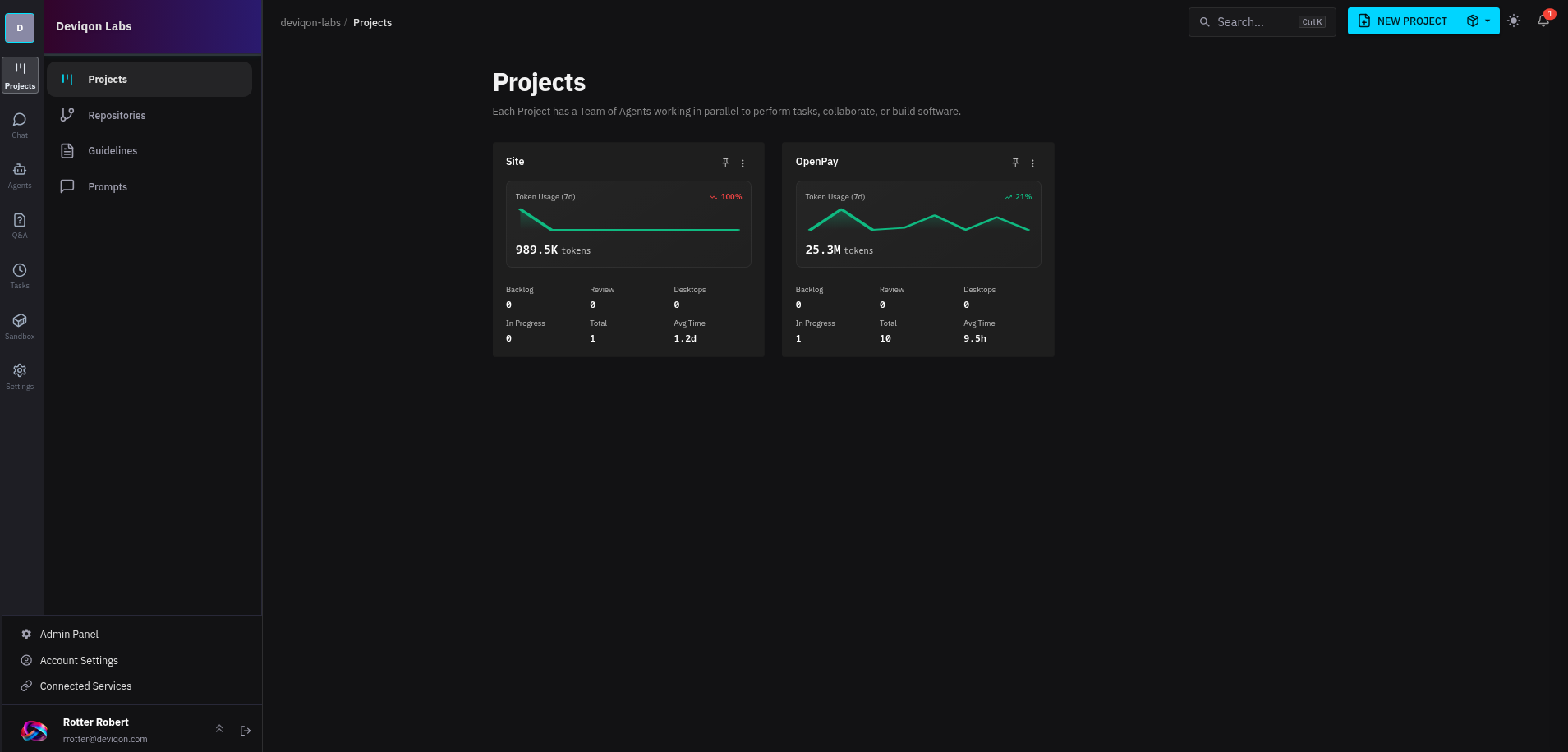
The OpenPay project has been the real test bed. It's our Romanian open-banking payment platform. Working inside a project looks like this:
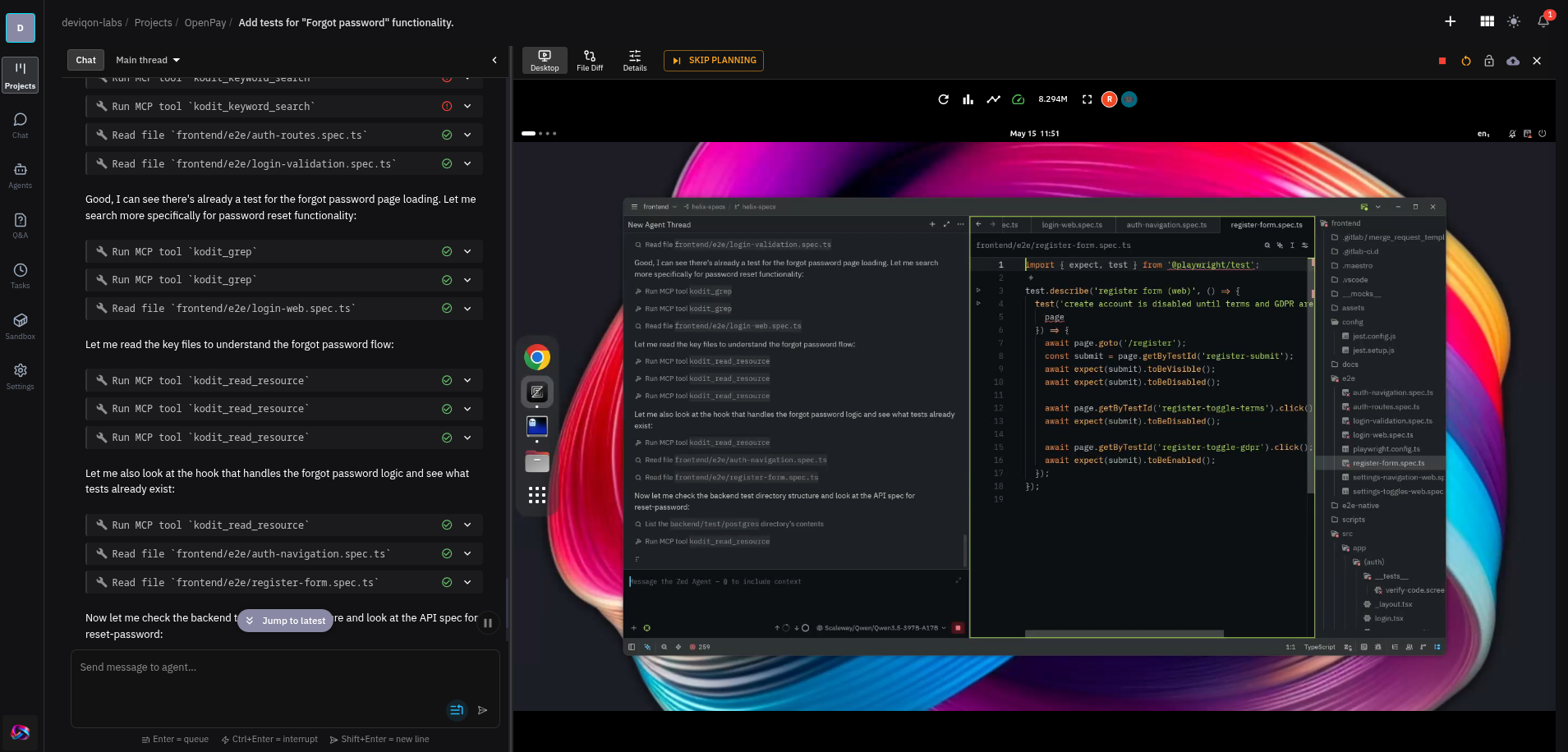
You can see the agent doing real navigation work in there: indexing the repo through Kodit, reading the spec files it found, and then iterating on the test in Zed. The desktop view is what makes the trust ladder climbable. When I started, I watched every keystroke. After a couple of weeks of clean PRs, I let it run while I worked on something else.
One rough edge worth naming: in this build, Qwen Code drives Zed directly and asks for explicit approval before nearly every tool call (open file, run shell, edit, save). On a multi-file refactor that's a lot of clicking, and it pulls you back into the loop right when the point was to step out of it. The HelixML team has confirmed a Qwen Code update is in flight that fixes this, so I'm not putting any energy into workarounds. Once it lands, the desktop becomes the observability surface I actually wanted it to be: watch when curious, ignore when not.
What's left, what's broken, what I'd file upstream
Things that work and I'm happy with:
- Single-Argo-app deploys for controlplane + sandbox + Intel operator + GPU plugin
- All secrets in Vault, no plaintext anywhere in git
- Mayastor for everything stateful; NFS strictly off the critical path
- One Talos node held at 1.11.6 for the duration of the Helix kernel-detection bug
- Qwen3.5-397B-A17B over OpenAI-compatible API as the default agent model
Still-open upstream bugs I've identified for HelixML:
iptables-legacyhardcoded insandbox/04-start-dockerd.shand the desktop image's17-start-dockerd.sh. Should detect kernel support and fall back toiptables-nft. Without this, the whole product breaks on kernel 6.17+./run/user/1000bind-mounted from workspace PVC. Should be a tmpfs (--tmpfs /run/user/1000:exec,mode=700,uid=1000,gid=1000). As-is, the storage class of the workspace PVC silently determines whether PipeWire works.SET vchordrq.probes = $1parameterization in the haystack RAG code path. Postgres doesn't allow parameterizedSET; should use string interpolation with proper validation.NoneType has no len()in the Unix-socket embedder verification code path. Nil check missing.
(1) and (2) are the painful ones. They cost the most debugging time. (3) and (4) are warnings, not blockers; they self-recover.
What I'm actually using it for
The first weekend it was fully operational, I pointed it at our production Sentry backlog. Three months of accumulated tickets across the OpenPay backend: null-pointer regressions in Go services, validation edge cases, a couple of cert-renewal-failure traces. I drafted task specs into the Backlog column. The agents picked them up in parallel. I reviewed PRs as they came in. Within a few sessions the backlog was cleared.
That's not a marketing claim. It's the practical thing. The backlog had been there because none of those tickets were worth my hour-per-fix at human pace, but each one was a 5-minute review at agent pace. Five parallel agents at 5 minutes per fix is a different economic equation than one human at 60 minutes per fix.
Now I'm experimenting with more complex tasks: multi-file refactors, framework migrations, the kind of thing where I'd previously have queued up a couple of focused days. The trust ladder is still building. I keep the desktop view open more than I need to. But the orchestrator is doing what the orchestrator promised. It's the difference between Stage 5 and Stage 6 on Yegge's chart, and on a real codebase it's visible.
The infrastructure-engineering tax to get here was non-trivial: a downgrade, three flavours of storage gotcha, GPU passthrough, half a dozen upstream bugs to track. But it's a one-time tax. The cluster runs itself now. And every line of code touched by an agent stayed inside our trust boundary the whole time. (If you want this exact stack built for your team without paying the engineering tax, you can reach out to Deviqon Labs).
Robert Rotter, Deviqon Labs
LATEST LABS
Automating Active Directory Test User Resets with PowerShell The Kubernetes Tax: How We Achieved Per-Microservice Blue-Green Deployments Using Kamal Deploying HelixML on Talos: from kernel ABI quirks to a working coding-agent fleet Deploying OpenEBS Mayastor on Talos Linux: A Production Guide The True Cost of the Post-NAB Roadmap: Scaling Specialized Engineering See AllLABS CATEGORIES
 News
Lab Projects
Article
News
Lab Projects
Article